Action1 RMM Review 2026: The Best Free Patch Management Tool for MSPs
TL;DR
Action1 is a cloud-native patch management platform that gives MSPs 200 endpoints free - permanently, with full feature parity to paid plans. In a 12-month field test by iFeeltech, it hit a 97% Windows patch success rate and a 12-minute time-to-first-patch. It's not a full RMM - no ticketing, no mobile app, limited macOS catalog - and it's honest about that. For MSPs who want best-in-class patching without the bloated unified platform tax, Action1 is an easy yes. Where it falls short is the work that patching automation creates: failed deployment alerts, vulnerability tickets, endpoint exceptions. That's where an AI technician like Tyqra picks up.
What is Action1 RMM - and what isn't it?
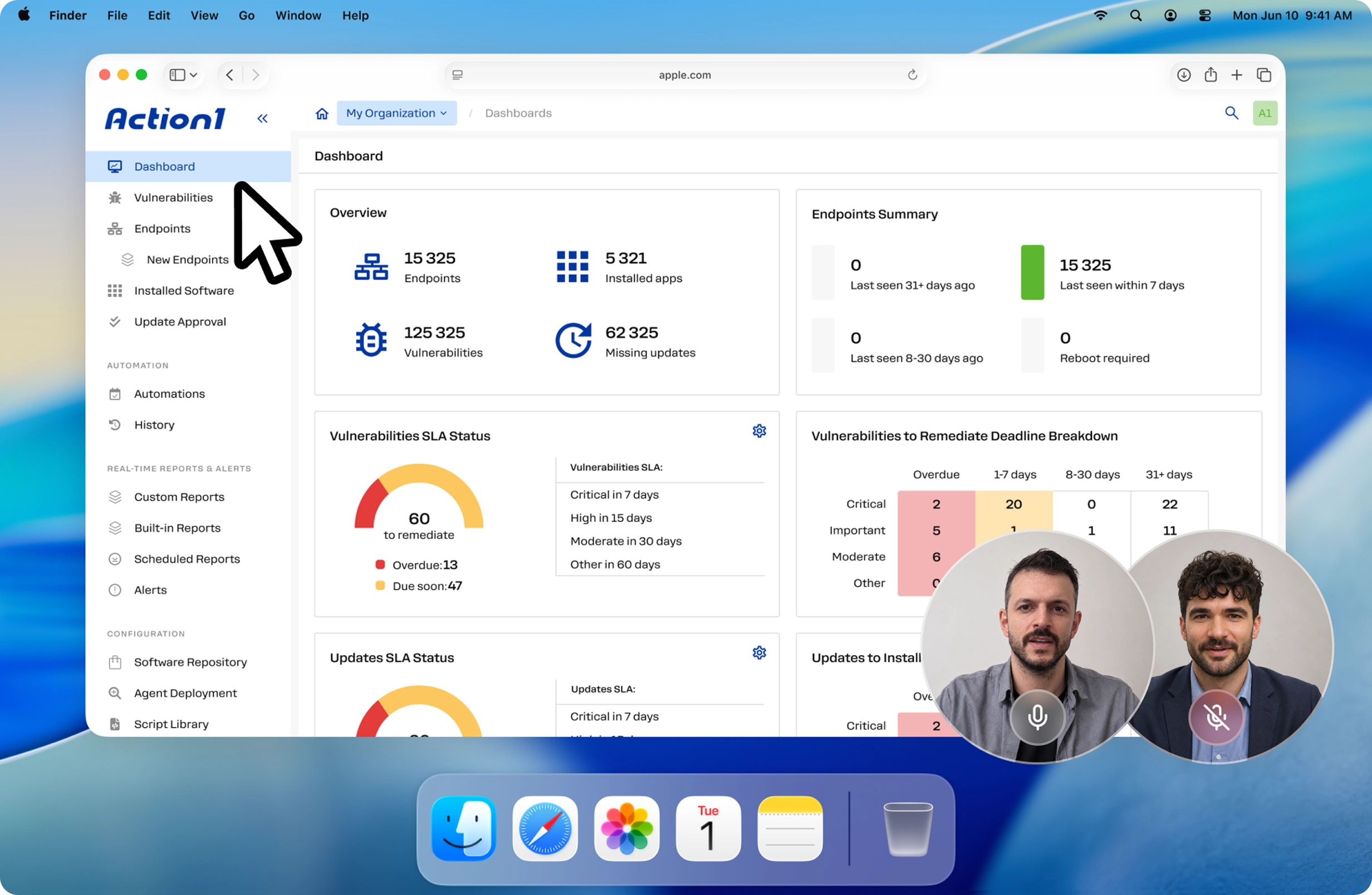
The "RMM" in the name is doing some heavy lifting. Action1 is really a cloud-native endpoint management platform built around one thing it does exceptionally well: automated patch management. It handles OS and third-party application updates across Windows, macOS, and Linux, adds vulnerability scanning on top, and throws in browser-based remote desktop access. What it doesn't do is everything a full RMM typically bundles - no ticketing, no PSA, no mobile app management, no network monitoring.
That's not a knock. It's a positioning choice, and one the MSP community has increasingly come around to appreciating.
"Action1 doesn't have any customer support on the free tier. For simple patching I think it's best-in-class. But it's not a full RMM." - r/msp
The people writing that aren't complaining. They're describing a product that knows its lane. In a market where "unified platform" is often a euphemism for "mediocre at many things," Action1 being great at patching and honest about what it isn't is refreshing.
The free tier that actually means it
The first question everyone asks: is the 200-endpoint free tier real?
Yes. Action1 expanded its permanent free tier from 100 to 200 endpoints in February 2025. No trial period, no feature restrictions, no credit card required. The free tier has full feature parity with paid plans - the only thing it lacks is SLA-backed support (free tier users get Discord and documentation).
For MSPs, the math gets interesting fast. Each managed client counts independently toward the 200-endpoint limit. An MSP with 10 clients at 150 endpoints each manages 1,500 endpoints total - at zero cost, because no single client crosses the threshold.
"I love Action1 for price to performance. Patching and Vulnerability are great! We've had it for a year and we're very happy. The CVE scans are great." - r/msp (2025)
The sustainability concern is understandable - we've all watched "free forever" become "free until we raise a Series B." Action1's free tier is contractually binding upon signup, and the 2025 expansion in the generous direction suggests it's not being quietly wound down. The community consistently cites it as the defining reason for adoption, and there's no signal that's changing.
Core features
Patch management
This is where Action1 earns everything it claims. The iFeeltech 12-month production field test across multiple SMB environments found:
| Patch type | Success rate |
|---|---|
| Windows security updates | 97% |
| Third-party Windows apps | 93% |
| macOS system updates | 89% |
| Failed deployments | 3–7% (retried automatically) |
Windows coverage spans OS updates (Windows 10, 11, Server 2016–2025) and 200+ third-party applications - Adobe, Chrome, Firefox, Slack, Teams, Visual Studio, remote tools, security software. macOS covers OS updates and ~30 applications, which is noticeably narrower. The Linux agent arrived in December 2025 (DEB and RPM distributions supported) and is still maturing; Windows is the clear flagship.
The deployment mechanics are solid. Silent installation runs during configured maintenance windows without user interaction. Peer-to-peer patch distribution shares files across endpoints on the same network segment, meaningfully reducing bandwidth for clients with multiple offices. Failed deployments queue and retry on the next cycle. The Install Now function bypasses scheduling for critical zero-day response.
97% Windows patch success rate, 12-minute time-to-first-patch - verified across a 12-month production deployment.
How the automated patch cycle works
The workflow runs start-to-finish without admin intervention:
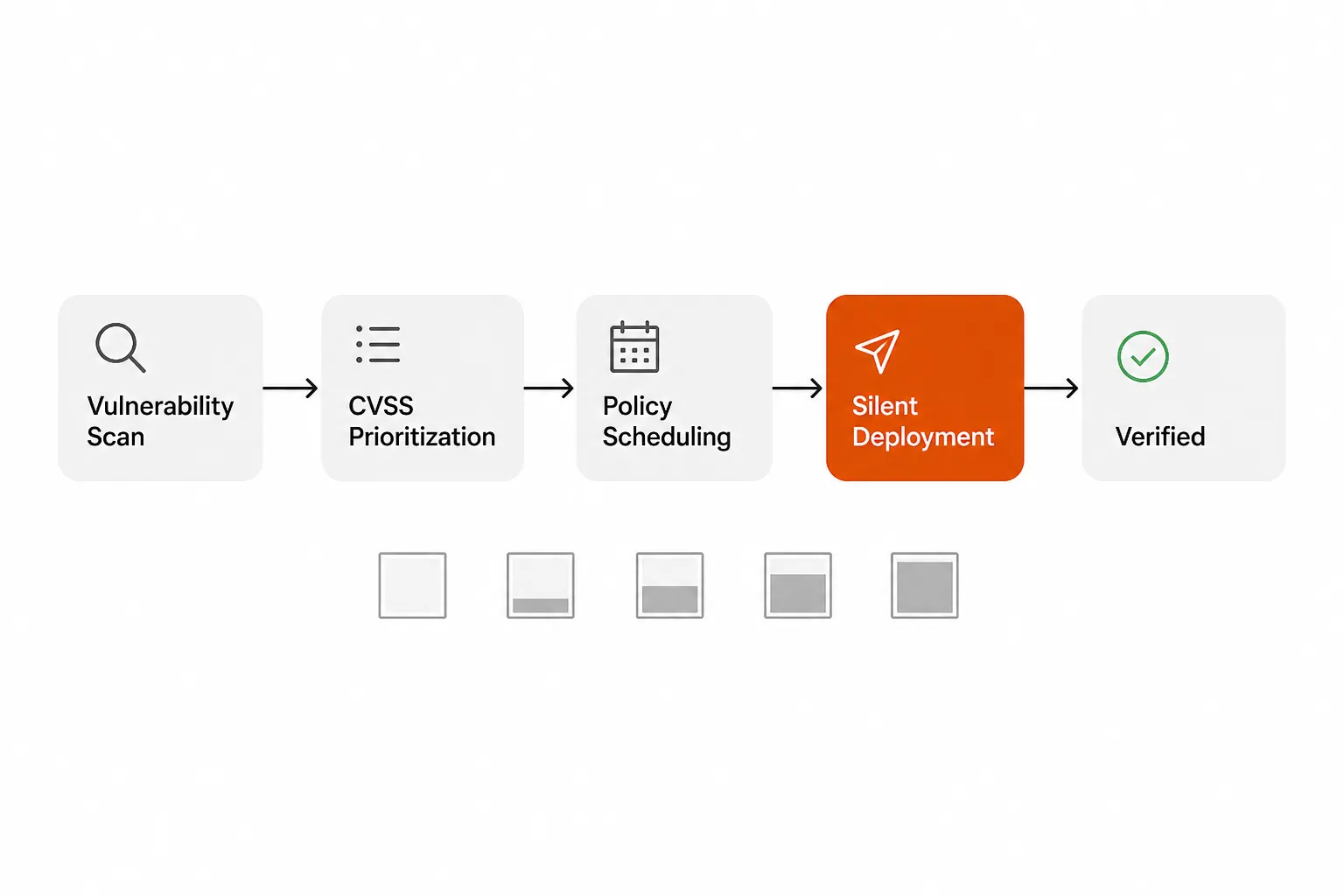
The system continuously scans endpoints, scores vulnerabilities by CVSS severity, schedules deployments against your maintenance windows, deploys silently, verifies installation, and flags anything that fails for retry or manual review. Critical patches are flagged overdue after 7 days; high-severity after 15. The whole loop happens without a technician touching it - the exceptions are the only things that need human eyes.
Vulnerability scanning
Action1's vulnerability scanner runs continuously and prioritizes findings by CVSS score. The dashboard surfaces highest-risk endpoints and vulnerability clusters, and generates exportable compliance reports for HIPAA, PCI DSS, SOC 2, and cyber insurance documentation. For MSPs pitching security posture to clients, the automated reporting alone saves meaningful prep time before quarterly reviews.
Remote desktop access
Browser-based remote access requires no additional client software - just open a session from the console. It's functional for troubleshooting and investigation, but it's basic. MSPs who need feature-rich remote support (session recording, file transfer, multi-monitor) typically pair Action1 with Splashtop or AnyDesk rather than relying on Action1's built-in access.
Software deployment
A catalog of 200+ Windows applications and ~30 macOS apps deploys silently without user interaction. For Linux, native package managers handle deployment. Custom application patching is possible via PowerShell (Windows) or Bash scripts, though building custom packages requires more technical skill than configuring catalog deployments.
Multi-tenant architecture for MSPs
The console is purpose-built for managing multiple clients. Each client gets a separate endpoint inventory, policies, permissions, and dashboard - technicians can be scoped to specific clients, preventing cross-client visibility. New clients onboard in 15–30 minutes (create account, generate installer, deploy via GPO or silent install, configure patch policy). Ongoing management is largely automated after that.
Action1 pricing
| Plan | Endpoints | Cost | Support |
|---|---|---|---|
| Free | 0–200 per org | $0 forever | Community (Discord + docs) |
| Growth | 201–1,000 | $4/endpoint/month (annual) + unpublished support fee | Phone + email SLA |
| Enterprise | 1,000+ | Custom quote | Dedicated account manager |
A few things worth knowing about the paid tier: the mandatory support fee is not published - you'll need to contact sales for the actual number. For a 500-endpoint organization, the math works out to roughly $14,400/year in endpoint fees (300 paid endpoints × $4 × 12) plus $2,000–$3,000 estimated for support - call it $6,800–$7,800/year total. The Enterprise tier carries volume discounts on per-endpoint cost.
The 15-day evaluation trial gives unlimited endpoints with full paid-tier support, reverting to the 200-endpoint free limit after the trial. No credit card required.
MSP profitability example (10 clients, mixed endpoint counts):
| Client | Endpoints | Action1 cost | MSP revenue at $12/endpoint/month | Margin |
|---|---|---|---|---|
| 9 clients at ~150 endpoints | 1,350 | $0 | $16,200/year | 100% |
| 1 client at 250 endpoints | 250 | $3,840/year | $36,000/year | 89% |
| Total | 1,600 | $3,840/year | $52,200/year | 93% |
Even carrying one over-threshold client, the blended margin on patch management stays above 90%.
What the MSP community actually says
Across 50+ Reddit threads on r/msp and r/sysadmin, the consensus is consistent: Action1 wins on patch management and free tier generosity, and the main complaint is that it's not a full RMM - which most users frame as a feature, not a bug.
"It's outstanding for patch management, which is why we mainly use it. Patches get pushed immediately and have a live progress view with logging." - r/sysadmin (2024)
"My stack right now is TacticalRMM, Threatdown EDR/MDR, Action1, M365; Simple stuff right now and looking to add more when it's needed." - r/SmallMSP (2025)
The best-of-breed stack composition (Action1 for patching, TacticalRMM or NinjaOne for monitoring and ticketing) has become a standard pattern in the community. The iFeeltech review landed at 4.2/5 after a full year in production across multiple SMB environments, citing reliability and the free tier as primary strengths with the macOS catalog gap and community-only support as meaningful limitations.
Action1 also received a Best Customer Support Award from Software Advice in 2025 - notable given the free tier runs without dedicated support.
Where Action1 falls short
We'd be doing you a disservice if we only covered the wins. Here's where it actually hurts:
No mobile app. There's no iOS or Android management console. For MSPs who do any work from their phones, this is a genuine gap - and there's no published roadmap for when it arrives.
macOS catalog is narrow. ~30 third-party applications versus 200+ on Windows. If your clients run significant macOS fleets with specific application needs, verify coverage before committing. You may find yourself maintaining manual update processes for apps outside the catalog.
Linux is new. The native Linux agent launched December 2025. The iFeeltech field test notes it as "less battle-tested than Windows/macOS." Real production data is limited by recency - pilot carefully before deploying at scale.
Community-only support on the free tier. Discord and documentation only. For MSPs in regulated industries or those managing large free-tier deployments, this creates real risk if something goes wrong at 11 PM. The paid-tier support SLA isn't published either, so you'd need a sales conversation to understand what you're actually buying.
No native API for ticket creation. There's no documented API to create tickets in your PSA when a patch fails. MSPs handle this manually (review dashboard, create ticket by hand) or via workarounds (Zapier/IFTTT forwarding alerts, not officially supported). For high-volume environments, this is friction.
Paid-tier mandatory support fee is opaque. The $4/endpoint/month endpoint cost is published. The mandatory support fee is not. For budgeting purposes, assume $2,000–$3,000/year minimum until you get an actual quote.
How Action1 compares
The honest comparison isn't Action1 against full RMMs - it's Action1 against the patching component of full RMMs.
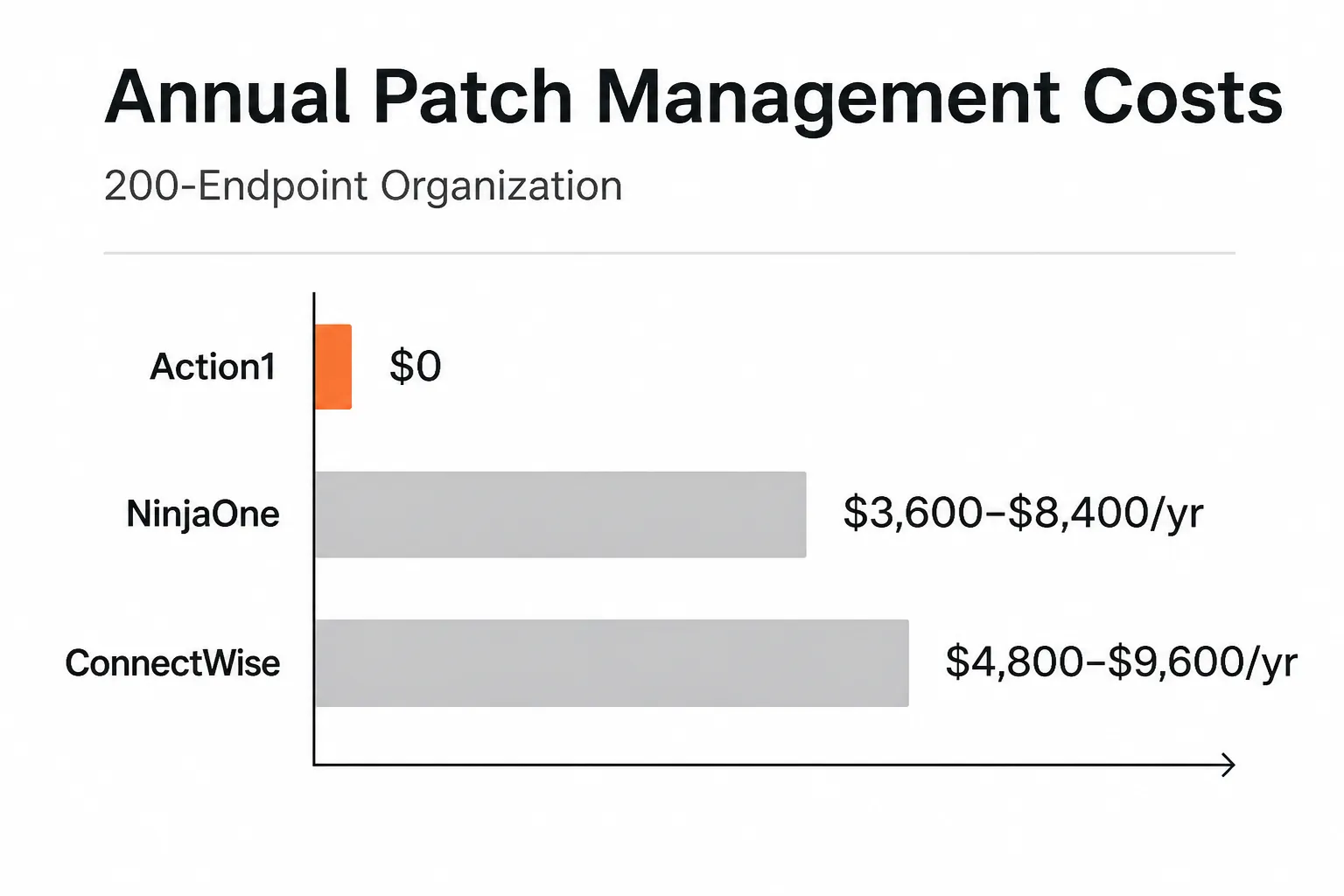
For a 200-endpoint organization:
| Platform | Annual patch management cost | Notes |
|---|---|---|
| Action1 | $0 | Full features, community support only |
| NinjaOne | $3,600–$8,400/year | $1.50–$3.50/endpoint/month; full RMM included |
| ConnectWise Automate | $4,800–$9,600/year | $2–$4/endpoint/month; scripting + monitoring included |
| SuperOps | ~$2,400–$4,800/year | Unified PSA+RMM; no permanent free tier |
| Datto RMM | Custom quote | Kaseya-owned; pricing opaque |
If patching automation is the primary job to be done, Action1 at $0 versus NinjaOne at $6,000/year for 200 endpoints is not a close call - as long as you're comfortable building a stack rather than buying a bundle. The full RMMs justify their cost when you need monitoring, ticketing, and mobile app management in the same platform. When you don't, you're paying for features you won't use.
The common MSP stack emerging in the community: Action1 (patching) + TacticalRMM or NinjaOne (monitoring) + a PSA for billing and ticketing. This composition typically runs under $3/endpoint/month versus $1.50–$3.50/endpoint for unified platforms - with the patching component actually being better than what most unified platforms ship.
The gap Action1 leaves for MSPs
Here's the thing nobody says out loud: great patch automation creates work.
When Action1 flags 60 overdue patches, 13 of them critical, there's a technician somewhere who has to triage those, figure out what broke, and decide what to touch. When a deployment fails across 30 endpoints of a healthcare client, someone needs to investigate, create a ticket, and close the loop. Vulnerability scanning surfaces findings that require follow-up. Zero-day response needs coordination.
Action1 handles the automation side of patching beautifully. It doesn't handle the L1 ticket resolution that patching exceptions generate - account unlocks from update-forced restarts, password resets after endpoints bounce, access issues triggered by software deployments. That work still lands on a technician.
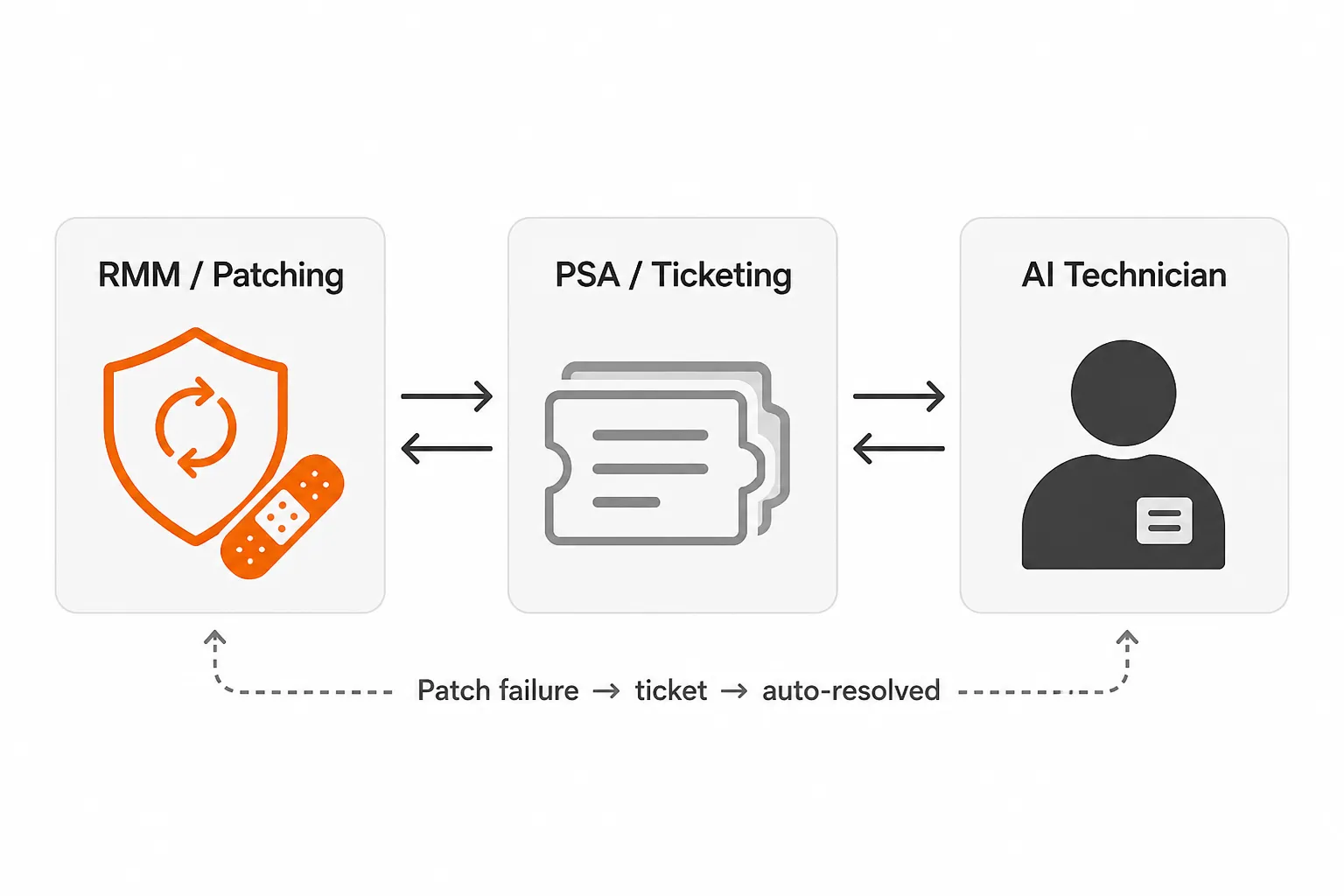
This is where an AI technician fits cleanly into the stack. The RMM and patching tool surface the issues; the PSA captures the tickets; an AI technician handles the resolution for the 40–60% of that volume that's routine - password resets, account unlocks, MFA issues, access requests - without a human having to touch it.
Try Tyqra
Tyqra is an AI technician built specifically for MSPs. It connects to your PSA, RMM, identity stack (Entra ID, Okta, JumpCloud, Google Workspace), and documentation tools, then autonomously resolves the L1 and lower-L2 tickets that fill your queue - password resets, account unlocks, onboarding, offboarding, software installs.
Where Action1 handles the patching layer, Tyqra handles the ticket resolution layer. Deploy them together and the grunt work largely disappears: Action1 patches automatically, and when patching creates downstream tickets (restarts causing lockouts, software deployments triggering access issues), Tyqra resolves them without a technician touching them.
It deploys in the same week. No 6-month implementation, no dedicated admin overhead, no workflow builder to babysit. The economics work at $3 per ticket outcome, with a $150/month minimum and no charge for tickets Tyqra can't move - most MSPs recover $7,000–$15,000/month in tech time across 50–100 hours of L1 grunt work that disappears.
Start with a 14-day free trial - no card required.
Frequently Asked Questions
Is Action1 RMM really free forever for 200 endpoints?
Yes. Action1's free tier covers up to 200 endpoints per organization with no time limit, no feature gating, and no credit card required. The limit was expanded from 100 to 200 endpoints in February 2025 and is contractually binding - not a trial. MSPs managing multiple clients under 200 endpoints each can operate entirely at zero cost across unlimited clients.
What's the difference between Action1 and a full RMM like NinjaOne?
Action1 is a best-of-breed patch management and vulnerability scanning platform. It does not include ticketing, helpdesk, mobile app management, or full monitoring in the way platforms like NinjaOne do. Many MSPs pair Action1 (for patching) with a separate monitoring RMM and a PSA for ticketing - a composition that often beats a single bloated platform on both cost and reliability.
Does Action1 support macOS and Linux?
Yes, but with limitations. macOS support covers OS updates and ~30 third-party applications - significantly narrower than the 200+ Windows apps in the catalog. Linux support (DEB and RPM distributions) was introduced in December 2025 and is still maturing; large Linux fleets should pilot before full rollout. Windows remains the strongest and most battle-tested platform.
Can MSPs use Action1 for multiple clients?
Yes. Action1's multi-tenant architecture lets MSPs manage unlimited clients from a single console with per-client isolation, separate policies, and role-based access. Each client counts independently toward the 200-endpoint free tier - so an MSP managing 10 clients at 150 endpoints each pays $0, even though they're managing 1,500 endpoints in total.
What happens when a client grows past 200 endpoints?
The first 200 endpoints for that client remain free. Endpoints 201 and above are billed at $4/endpoint/month (annual billing), plus a mandatory support fee that isn't publicly disclosed - you'll need a quote from Action1 sales. Other clients under the 200-endpoint threshold stay free regardless. No service interruption occurs during the transition.