Best managed email security solutions for MSPs in 2026
TL;DR
One in three emails is now malicious or spam, and Microsoft detected 7.6 billion phishing threats in Q2 2026 alone. For MSPs, that means email security isn't an upsell anymore - it's a baseline expectation. The tricky part is that Microsoft 365's built-in defenses catch most commodity spam but miss the sophisticated stuff: AI-generated BEC, QR-code phishing, and adversary-in-the-middle attacks that bypass MFA.
The six solutions below cover the spectrum from Microsoft's own Defender (great value when bundled into M365 Business Premium) to AI-native platforms like IRONSCALES built for teams drowning in SOC alerts. Our top pick for MSPs who want MSP-native tooling, proven detection rates, and a true multi-tenant portal: Barracuda Email Protection - winner of MSP Today Product of the Year 2026. For enterprise-grade clients willing to pay for Gartner Magic Quadrant credibility: Mimecast or Check Point Harmony Email.
One thing most guides miss: email security tools don't just catch threats, they create work. Every ATO detection, every compromised-account lockout, every phishing incident triggers password resets and account unlocks downstream. Tyqra handles those L1 tickets autonomously - so your techs spend time on the threats, not the cleanup.
Why email security matters more than ever in 2026
We've been saying "email is the #1 attack vector" for years. The problem is the threat landscape keeps shifting underneath that headline in ways that make older solutions look increasingly naive.
90% of high-volume phishing campaigns now use phishing-as-a-service (PhaaS) kits - turnkey attack infrastructure that lets low-skill actors run sophisticated campaigns at scale. QR codes embedded in PDFs jumped to 70% of malicious PDFs as attackers found they bypass most URL-scanning filters. Adversary-in-the-middle (AiTM) kits steal session tokens in real time, rendering MFA insufficient on its own.
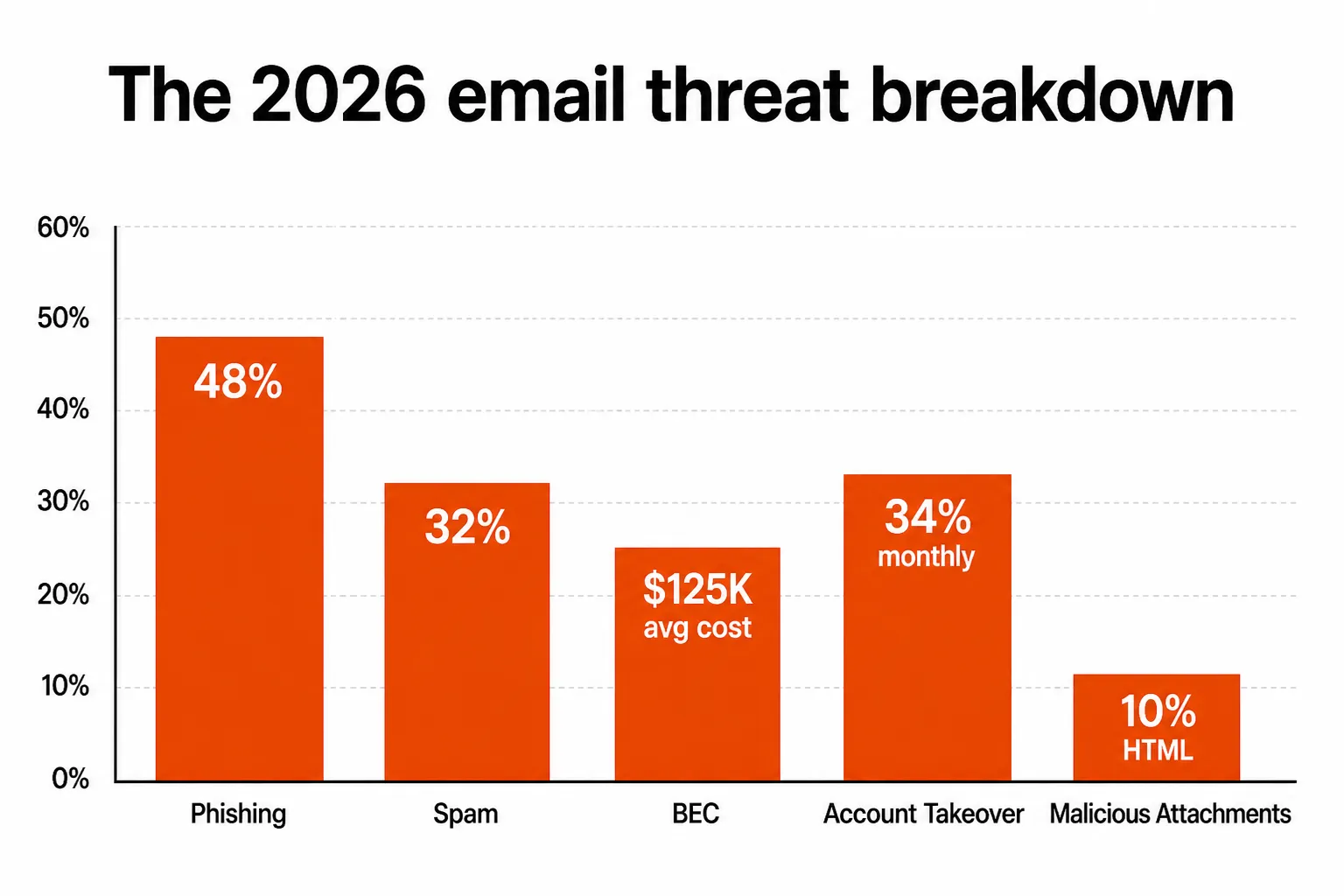
The cost math is stark. Business Email Compromise averages $125,000 per incident. 34% of companies experience account takeover monthly. Phishing increased 61% year-over-year in 2025. For MSPs managing 50 or 100 small businesses, the expected annual impact across a client base is material.
The good news: layered email security catches most of this. The challenge for MSPs is choosing the right layer at a price point their SMB clients will accept.
What to look for in managed email security
Before the list: a few capabilities that separate purpose-built solutions from checkbox vendors.
Multi-tenant management. This is non-negotiable for MSPs. You need one dashboard to manage policies, incidents, and billing across all clients. Solutions without a genuine MSP portal (consolidated alerting, bulk policy deployment, per-tenant reporting) create per-customer console switching that kills margins fast.
Post-delivery detection. Gateway filtering blocks threats before delivery, but sophisticated attacks - AiTM, BEC, QR phishing - often pass initial checks. The ability to detect and remediate threats already in inboxes (what Microsoft calls Zero-hour Auto Purge, what Barracuda calls Automated Incident Response) is what separates modern platforms from legacy filters.
Account takeover detection. Email security that only looks at inbound messages misses the second phase of an attack. Once a credential is compromised, attackers send phishing from trusted accounts and bypass conditional access. Look for ATO detection that integrates with your identity stack.
API-first deployment. MX-based gateways require DNS changes and client coordination. API-native solutions (Barracuda, Mimecast in API mode, Avanan) connect directly to M365 or Google Workspace mailboxes in minutes, not weeks.
Training integration. Phishing simulation and awareness training co-located with detection closes the loop - users get trained on the exact attack types hitting their inboxes, not generic scenarios.
Quick comparison
| Solution | Best for | Deployment | MSP portal | Starting price |
|---|---|---|---|---|
| Microsoft Defender for O365 | M365-native baseline | API (bundled) | No native MSP portal | $2/user/mo (Plan 1 add-on) |
| Barracuda Email Protection | MSPs wanting all-in-one + M365 backup | API, no MX change | Yes - purpose-built | $5.20/user/mo (Advanced, MSRP) |
| Mimecast | Enterprise-grade, Gartner-credentialed | API or MX | Yes - Mimecaster Central | Custom (quote-based) |
| N-able Mail Assure | MSP-native collective intelligence | MX-based | Yes - multitenant SaaS | Per-user (quote-based) |
| IRONSCALES | Teams drowning in SOC alerts | API (mailbox) | MSSP/MSP program | Custom (quote-based) |
| Check Point Harmony Email | API-first, DLP bundled, multi-platform | API | MSP/MSSP reseller | Custom (quote-based) |
1. Microsoft Defender for Office 365 - the one you almost certainly already have
If your clients are on M365 Business Premium ($22/user/month), they already have Defender for Office 365 Plan 1. That bundles Safe Links (URL wrapping and real-time scanning), Safe Attachments (sandbox detonation for attachments, ~15 minutes), and anti-phishing policies with impersonation detection.
Plan 1 vs Plan 2:
| Feature | Plan 1 ($2/user/mo) | Plan 2 ($5/user/mo) |
|---|---|---|
| Safe Attachments | Yes | Yes |
| Safe Links | Yes | Yes |
| Anti-phishing / impersonation | Yes | Yes |
| Real-time detections | Yes | Yes |
| Automated Investigation & Response (AIR) | No | Yes |
| Threat Explorer | No | Yes |
| Attack simulation training | No | Yes |
| Threat Trackers | No | Yes |
Plan 2 adds the automation that makes MDO genuinely useful for SOC-light MSPs - AIR automatically investigates compromised accounts, runs remediation playbooks, and contains threats without manual intervention. For clients on E3/E5 or larger, Plan 2 is usually already included.
The honest limitations: MDO lacks a native multi-tenant MSP management portal. If you're managing 40 clients, you're either switching consoles per tenant or investing in a third-party management layer. That's the gap where Barracuda, Mail Assure, and Mimecast earn their keep. MDO is also notably weaker on BEC detection than dedicated platforms - behavioral AI that catches subtle sender impersonation is still more mature in specialist tools.
Our take: Start here. If you're putting clients on M365 Business Premium anyway, MDO Plan 1 is effectively free. Configure it properly (impersonation protection, DMARC enforcement, ZAP enabled) and it handles commodity threats well. Layer a dedicated solution on top for clients with real BEC exposure or compliance requirements. Don't pay for Plan 2 standalone when M365 E3 ($36/user/mo, which includes Plan 2) might make more total sense.
2. Barracuda Email Protection - best for MSPs wanting a true multi-tenant platform
Barracuda Email Protection is the most MSP-purpose-built platform on this list - MSP Today Product of the Year 2026, built around a genuine multi-tenant portal where you manage every customer's security, policies, and incidents from one view without console-switching.
The core detection engine is Barracuda IQ - a multi-model AI that handles account takeover detection, post-delivery threat re-evaluation, and automated remediation ("Clawback," which removes threats from mailboxes across entire tenants in near real-time). It deploys via API directly into Microsoft 365 or Google Workspace without MX changes, which is a meaningful operational advantage - most clients are live within an hour.
A feature called Bailey is genuinely useful: conversational AI that translates every detection decision into plain language. When a client asks "why was this email quarantined?", Bailey gives you a clear answer instead of a confidence score.
Pricing:
| Plan | Price (MSRP) | Highlights |
|---|---|---|
| Advanced | $5.20/user/mo | Core email protection, AI detection, Clawback, multi-tenant portal |
| Premium | Adds M365 backup | Exchange, OneDrive, SharePoint, Teams, Entra ID backup included |
| Premium Plus | Adds compliance + training | Archiving, security awareness training, phishing simulations |
MSP pricing is lower than MSRP; Barracuda's partner program provides volume discounts. The margin structure is workable for resale at $8–12/user/month to SMB clients.
The honest limitations: Advanced plan has no M365 data backup - you'll need Premium to add that ($), which pushes per-user cost higher. User awareness training is Premium Plus-only; if you want detection and training in one platform without upgrading, competitors bundle it more generously at the Advanced tier.
"The Barracuda multi-tenant portal means I'm not jumping between 30 different consoles. The centralized incident view alone saves us hours every week." - r/msp discussion on Barracuda Email Protection
Our take: The default choice for MSPs who want purpose-built MSP tooling, predictable per-user billing, and API-first deployment. The Advanced tier handles most SMB clients well. Upgrade to Premium when clients need M365 backup (and they should - backup is a separate but adjacent conversation). IRONSCALES wins on pure AI sophistication; Barracuda wins on operational simplicity and MSP portal maturity.
3. Mimecast - best for enterprise-credentialed clients demanding Gartner-ranked coverage
Mimecast protects 42,000+ organizations and was named a Leader in the 2025 Gartner Magic Quadrant for Email Security. For MSPs serving regulated industries or enterprise clients where procurement committees run security vendor checklists, that analyst recognition carries weight.
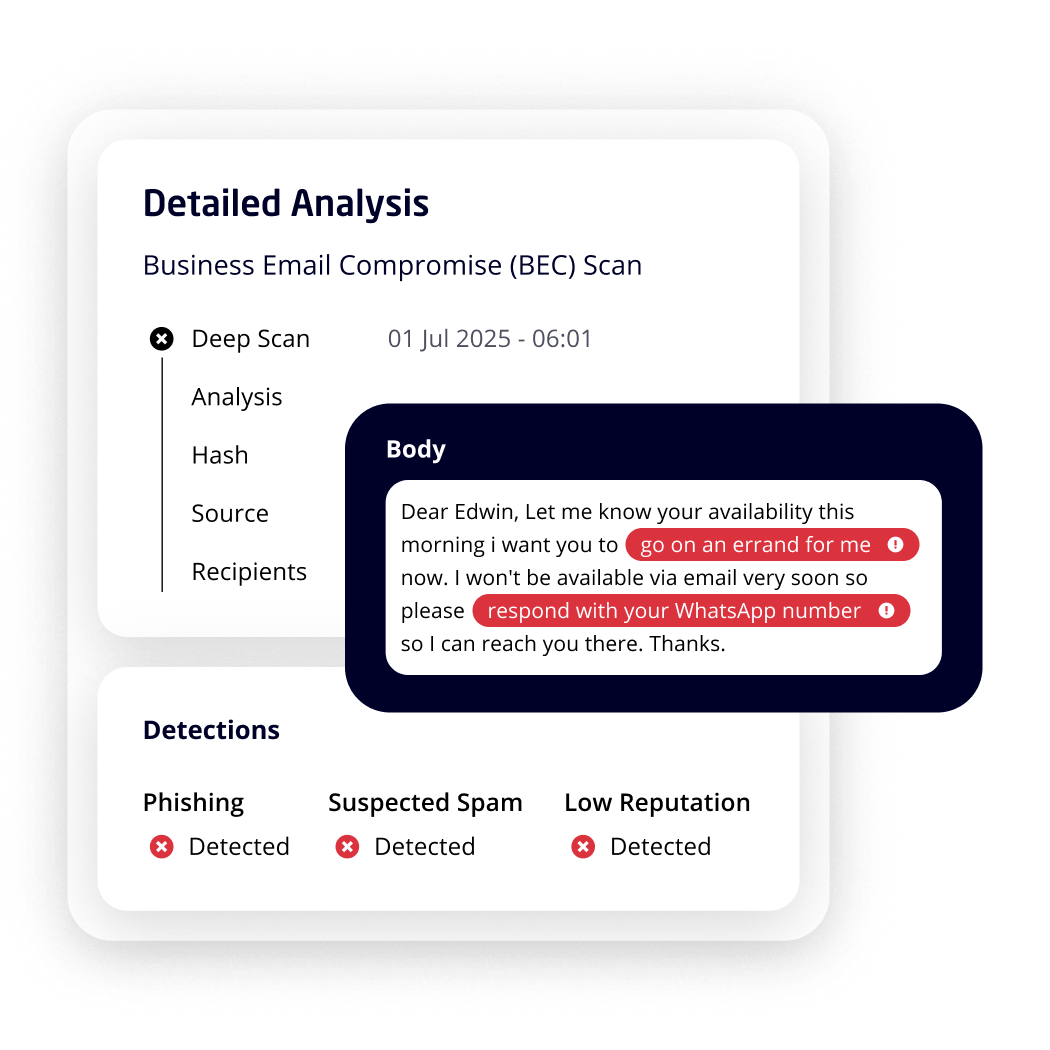
The platform's BEC detection - visible in the screenshot above - runs deep scan analysis on flagged messages, highlighting suspicious phrases ("go on an errand for me," "respond with your WhatsApp number") with risk indicators, and cross-referencing sender behavior, domain reputation, and recipient communication history. It's not just keyword matching; it's behavioral modeling against a social graph of historical communication.
Deployment is flexible: API-based (no MX changes, connects directly to M365 or Google Workspace) or MX-based gateway (inline perimeter for organizations that prefer it). The gateway mode is particularly useful for clients with on-premises Exchange hybrid deployments that MDO doesn't cover cleanly.
Plans:
| Tier | Focus |
|---|---|
| Critical | Core threat protection - AI BEC, phishing, malware |
| Advanced | Enhanced data protection capabilities |
| Premium | Full email + collaboration (Teams, Slack, SharePoint) |
All pricing is custom and quote-based - Mimecast doesn't publish per-user rates. For mid-market and enterprise, expect $6–12+/user/month. The G2 rating is 4.5/5 across 767 reviews, with consistent praise for threat detection quality and complaints about admin console complexity on initial setup.
The honest limitation: Mimecast is not a cheap option, and the pricing process - quote-based, negotiated - adds friction to the MSP sales motion. For SMB clients on tight budgets, Barracuda or N-able deliver 80% of the protection at a more predictable price point.
Our take: If you're managing larger clients in finance, healthcare, or law who need documented Gartner-credentialed coverage, Mimecast belongs on the shortlist. For standard SMB MSP work, the price and complexity aren't justified over Barracuda or N-able. Worth noting: if a client's procurement team is going to run a security vendor review, a Gartner Magic Quadrant Leader appearance closes deals faster than "we use a good platform you've never heard of."
4. N-able Mail Assure - best MSP-native platform with collective threat intelligence
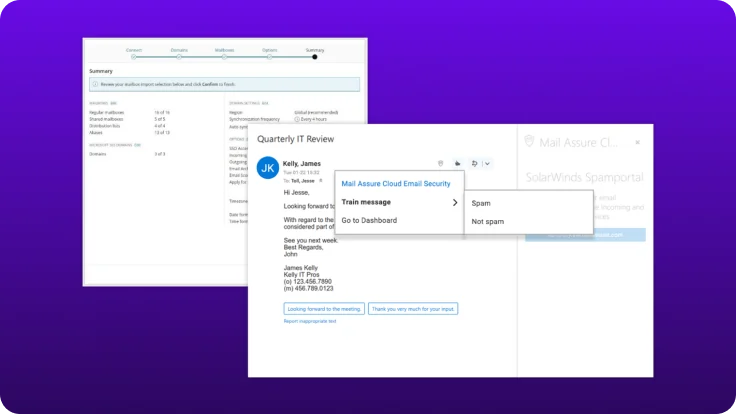
N-able Mail Assure is the most MSP-native option on this list in the traditional sense - built as a SaaS product for partners, sold through N-able's channel, and deeply integrated into the N-able partner ecosystem (PSA, RMM, billing).
The differentiator is collective threat intelligence. Mail Assure analyzes patterns across 23 million mailboxes, blocking 2+ billion spam messages monthly and 10+ million phishing attacks monthly. Virus Bulletin awarded it VBSpam+ with a 100% malware block rate and 99.99% phishing catch rate - independent third-party validation that matters when clients ask "but how do you know it works?"
The multitenant management console covers all partner domains and settings in one view, with a setup wizard for Microsoft 365 that handles OAuth onboarding without MX changes. Email continuity is built in - if a client's mail server goes down, end users continue sending and receiving email through Mail Assure's Private Portal, with messages syncing back automatically on restore.
The honest limitations: Mail Assure's detection engine is excellent for known threats and commodity spam at scale. For cutting-edge AI-generated BEC and QR-code phishing, dedicated AI platforms like IRONSCALES or Barracuda's IQ engine may catch more. Pricing is quote-based through N-able's partner program, which limits pricing transparency for comparison shopping.
"The Mail Assure spam protection is great. Very easy to use after initial configuration. I haven't had any issues with spam emails."
- Dennis Moloney, Newport Systems Inc., N-able testimonial
"Business continuity feature... clients are sold on the solution."
- Ken Kohn, Miracle Data, N-able testimonial
Our take: Natural fit for MSPs already in the N-able ecosystem. If you're on NinjaRMM or Datto and don't have a strong N-able commitment, the platform integration argument weakens - but the core email security is genuinely solid. The collective intelligence model means you benefit from threat patterns your own client base hasn't seen yet. That's a real advantage at scale that pure-AI models don't replicate.
5. IRONSCALES - best for MSPs and MSSPs facing sophisticated AI-generated threats
IRONSCALES occupies a distinct position: it's the only platform on this list that explicitly addresses deepfake-enabled email attacks, which 72% of enterprises now list as a top concern. The platform combines adaptive AI threat detection with a human-in-the-loop model - 25,000+ analysts provide collective threat hunting insights that feed back into detection models in real time.
The automation numbers are striking. IRONSCALES claims 99.7% of threats remediated automatically, and a City of Memphis case study reports 95% reduction in manual SOC hours after deployment. The agentic automation handles autonomous threat investigation, classification, and remediation across affected mailboxes - not just quarantine, but full investigation and response.
GPT-powered phishing simulations are built in at all tiers, generating personalized attack scenarios based on what's actually hitting your clients' inboxes. That's a more compelling training pitch than generic awareness modules - "we simulate what attackers are actually sending your people right now."
"Mailbox-level solution stood out for its simplicity. Its quick setup, compared to alternatives, resonated with us."
- Peter Evans, Head of Cybersecurity Operations, Chubb
"Cut the number of man hours down by 95%."
- Augustine Boateng, Interim CIO, City of Memphis
Pricing is custom and requires a demo/quote. For MSPs and MSSPs, there's a dedicated program - though the MSP-specific portal and billing model are worth evaluating carefully against Barracuda's more mature partner infrastructure.
Our take: Best choice for MSSPs managing security operations for mid-market clients with real SOC overhead. The AI sophistication - deepfake detection, agentic automation, human-loop feedback - exceeds what any other platform on this list delivers. The trade-off: pricing opacity and a sales motion that's heavier than Barracuda or Mail Assure. Smaller MSPs managing 10–50 SMB clients may find the complexity-to-value ratio tilts toward simpler alternatives. Larger MSSPs with dedicated security practice teams should absolutely evaluate it.
6. Check Point Harmony Email (Avanan) - best API-first option with DLP bundled
Check Point Harmony Email & Collaboration (formerly Avanan, acquired 2023) was named a Leader in the 2025 Gartner Magic Quadrant for Email Security alongside Mimecast and Microsoft. Its API-first architecture is the cleanest on this list - no proxy, no MTA redirect, no DNS changes, connects directly to Microsoft 365 or Google Workspace via API in minutes.
The 65,000+ customer deployment base includes enterprises, MSPs, and MSSPs across 50+ industries. The core detection runs on ThreatCloud AI - 50+ proprietary AI engines claiming 99.9% malware prevention and 99.7% phishing prevention. Data Loss Prevention (DLP) is bundled at no extra cost, which is a meaningful differentiator - most competitors add DLP as a paid add-on.
Multi-platform coverage extends beyond email to Teams, Slack, Dropbox, Box, and ShareFile from one console. For clients that have expanded collaboration tools and want one vendor protecting all of it, this is the most complete answer.
Audit-only mode (log without blocking) lets you deploy into production environments risk-free, validate detections against your clients' real traffic for 30 days, then switch to blocking mode. That's a useful proof-of-value motion for prospects sitting on the fence.
Our take: Strong alternative to Mimecast for MSPs who want Gartner credibility without Mimecast's setup complexity. The bundled DLP and multi-platform coverage (not just email) make it the logical choice for clients using Teams + Slack + email as their collaboration stack - you cover all attack surfaces from one console. Pricing is custom and requires a sales conversation. Worth evaluating if you have clients with meaningful DLP requirements or broad collaboration stack exposure.
How to pick
The honest answer: there's no single best option. Here's the decision logic we'd use.
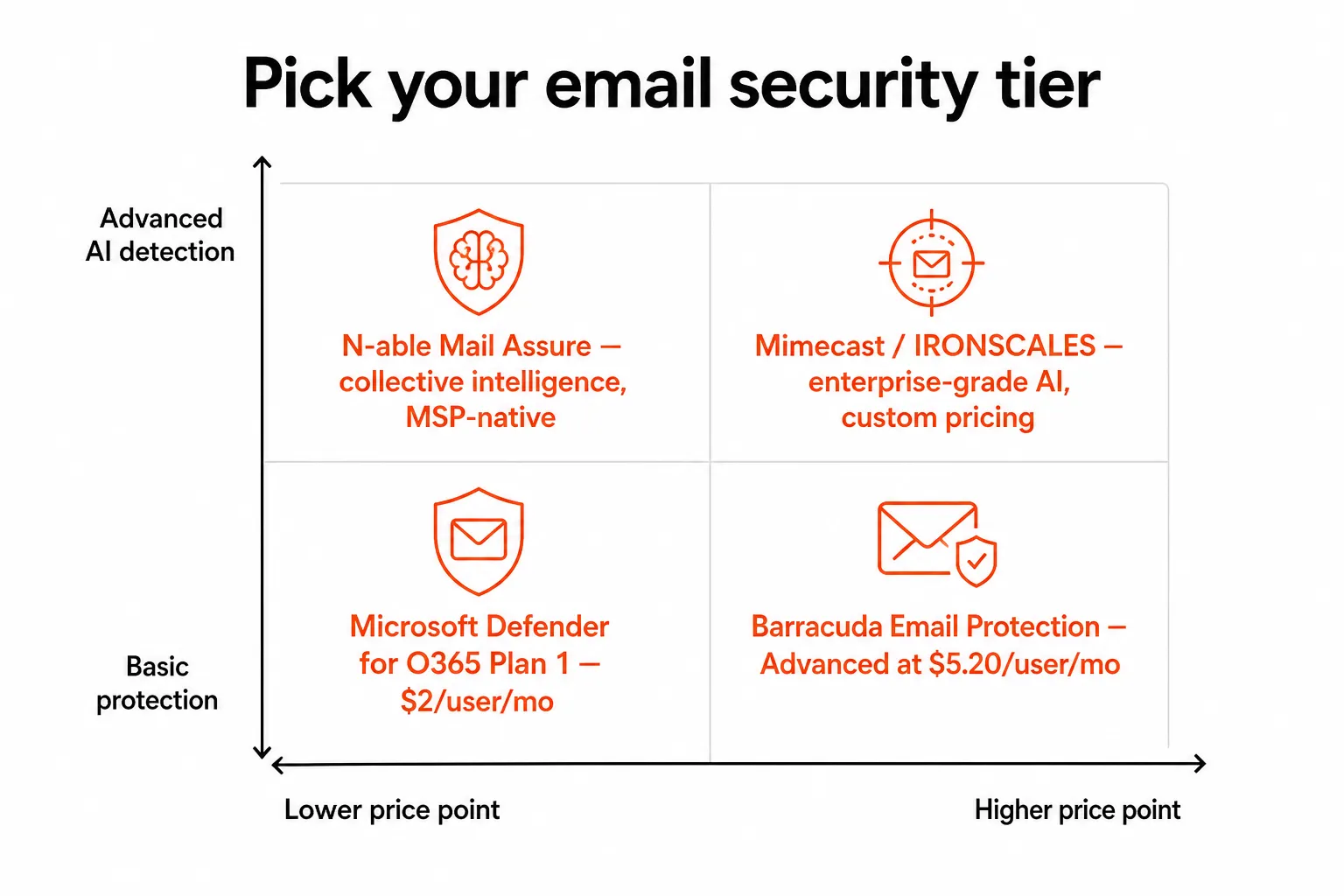
Start with Microsoft Defender for Office 365 for any client already on M365 Business Premium. It's bundled, it's good enough for most SMBs, and configuring it properly (DMARC, Safe Links, Safe Attachments, ZAP) is free training. The gap opens when you hit multi-tenant management, BEC sophistication, or compliance requirements MDO doesn't cleanly address.
Layer Barracuda or N-able on top when you want a genuine MSP multi-tenant portal, API deployment, and post-delivery remediation. Barracuda for MSPs wanting M365 backup bundled and one vendor for more of the security stack. N-able for MSPs already in the N-able ecosystem or who want third-party validated detection rates.
Move to Mimecast or Check Point Harmony Email when clients have procurement requirements that include Gartner analyst coverage, or when DLP and collaboration security (Teams + Slack) need to be covered by one platform.
Go to IRONSCALES when you're operating a security practice, managing SOC workload across clients, or serving clients in sectors where AI-generated BEC and deepfake attacks are active threats - finance, legal, healthcare, government.
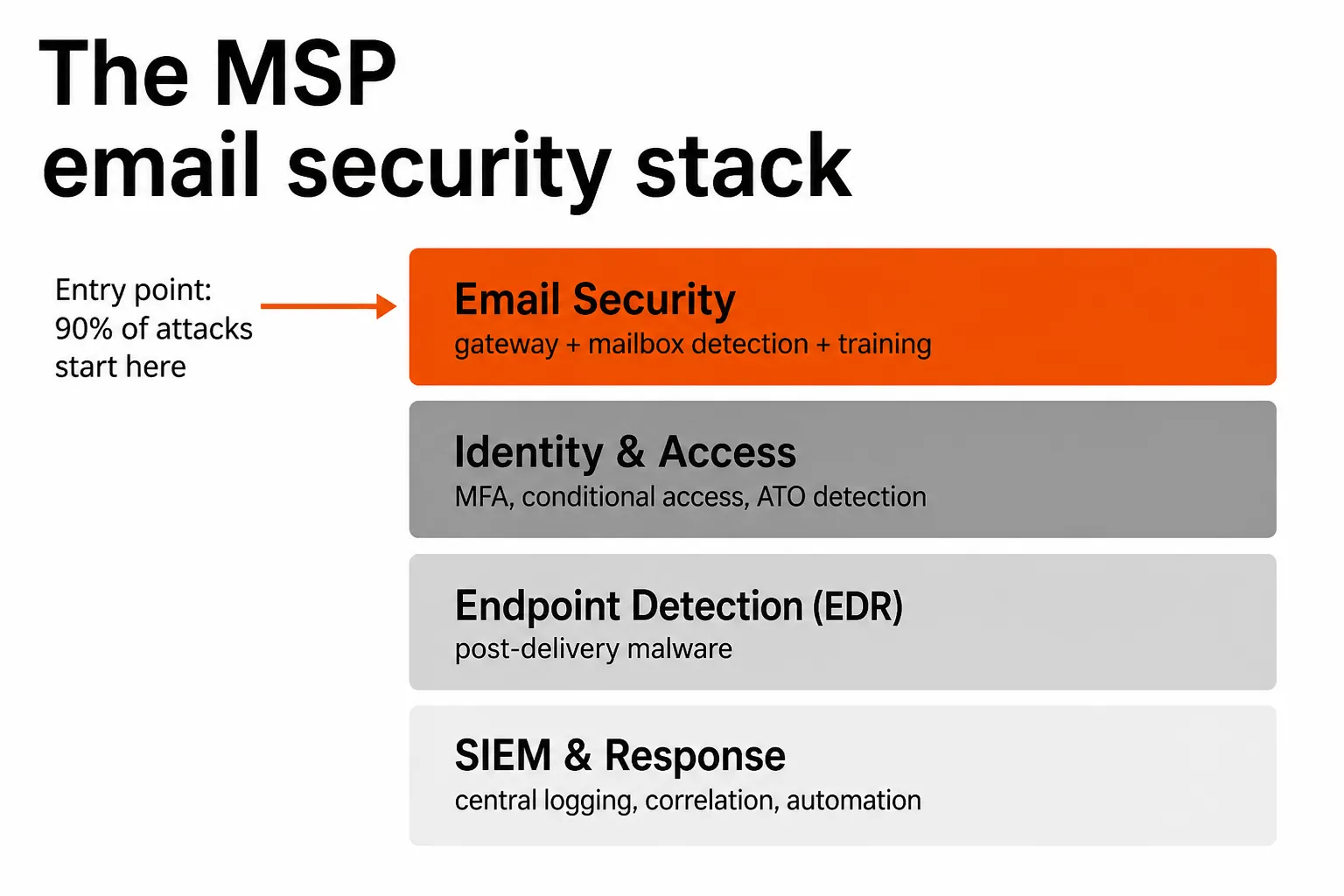
One operational note that most comparisons skip: every email security tool generates downstream support tickets. ATO detections trigger password resets. Phishing remediations lock accounts. Compromised-credential cleanup requires offboarding and reprovisioning. If those L1 tickets are hitting your tech desk manually, you're absorbing the operational cost of your email security investment.
Try Tyqra
Tyqra is an AI technician purpose-built for MSPs that autonomously handles the L1 and L2 tickets your email security tools generate. Password resets after phishing incidents, account unlocks triggered by ATO detection, onboarding and offboarding when credentials are compromised - Tyqra handles those tickets end-to-end without a technician touching them, connecting directly to Entra ID, Okta, JumpCloud, and Google Workspace.
Where most managed email security platforms stop at detection and quarantine, Tyqra picks up the remediation work that follows. Same-week deployment, $3 per ticket outcome with a $150/month minimum, no implementation consultants required. MSPs typically recover 50–100 hours/month of L1 work - $7,000–$15,000/month in recovered tech time at scale.
The combination of layered email security (catch the attack) and Tyqra (handle the aftermath) closes the loop that most MSP security stacks leave open.
Frequently Asked Questions
What is managed email security for MSPs?
Managed email security is a cloud-delivered service that protects client mailboxes against phishing, business email compromise (BEC), ransomware, and account takeover. MSPs layer it on top of native Microsoft 365 or Google Workspace security to catch threats those platforms miss - and manage it across all client tenants from one portal. Solutions like Barracuda Email Protection and N-able Mail Assure are purpose-built for this model.
Is Microsoft Defender for Office 365 enough for MSP clients?
For many SMB clients, Microsoft Defender for Office 365 Plan 1 (included in M365 Business Premium at $22/user/month) covers the basics well. Plan 2 adds automated investigation and attack simulation. The gap is multi-tenant management - MDO doesn't have a native MSP portal, which is why many MSPs layer a dedicated solution like Barracuda's MSP portal or Mail Assure on top.
How much does managed email security cost per user per month?
Pricing ranges from $2/user/month (Microsoft Defender Plan 1 standalone) to $5–12/user/month for dedicated solutions like Barracuda Email Protection Advanced ($5.20 MSRP) or enterprise-tier platforms like Mimecast and IRONSCALES (custom pricing). MSPs typically resell at $6–12/user/month, generating $3–12/user/month in recurring margin.
What is business email compromise (BEC) and how do email security tools detect it?
BEC attacks impersonate trusted senders - executives, vendors, IT - to trick employees into wire transfers, credential disclosure, or data leaks. They cost an average of $125,000 per incident. Modern email security tools detect BEC through behavioral AI that builds a social graph of normal communication patterns, then flags anomalous sender behavior, lookalike domains, and display-name spoofing - even when the email passes SPF/DKIM authentication.
Does managed email security generate support tickets, and can those be automated?
Yes - and this is one of the underappreciated operational costs. Email security tools generate alerts for compromised accounts, password reset requests after phishing incidents, and account unlock requests after ATO detection. MSPs using Tyqra can have those L1 tickets resolved autonomously - password resets, account unlocks, and identity remediation completed without a technician touching them.