Microsoft 365 user provisioning for MSPs: stop doing it by hand in 2026
TL;DR
Manual M365 user provisioning costs MSPs 30–45 minutes per user - and for a 50-customer MSP with regular hiring, that's 250+ hours of technician time every month. The part everyone talks about is onboarding. The part that actually costs money is offboarding: 10–20% of customer licenses stay active after employees leave, and incomplete access revocation is a compliance problem waiting to surface. The fix isn't a new portal - it's automating the full ticket-to-action cycle, so provisioning and offboarding happen the moment a ticket comes in, not when a tech has a free hour. Tyqra handles this for $3 per ticket outcome with a $150/month minimum, connects to your PSA and identity stack same week, and posts an audit trail on every action.
What Microsoft 365 user provisioning actually involves
"Provisioning" sounds simple until you write out the full list. Creating a user in Microsoft Entra ID is step one of about twelve.
A complete M365 user provisioning workflow for a new hire includes:
- Create the Entra ID account - username, UPN, department, manager attribute
- Sync to on-premises Active Directory (for hybrid environments) - with a 15–30 minute sync delay
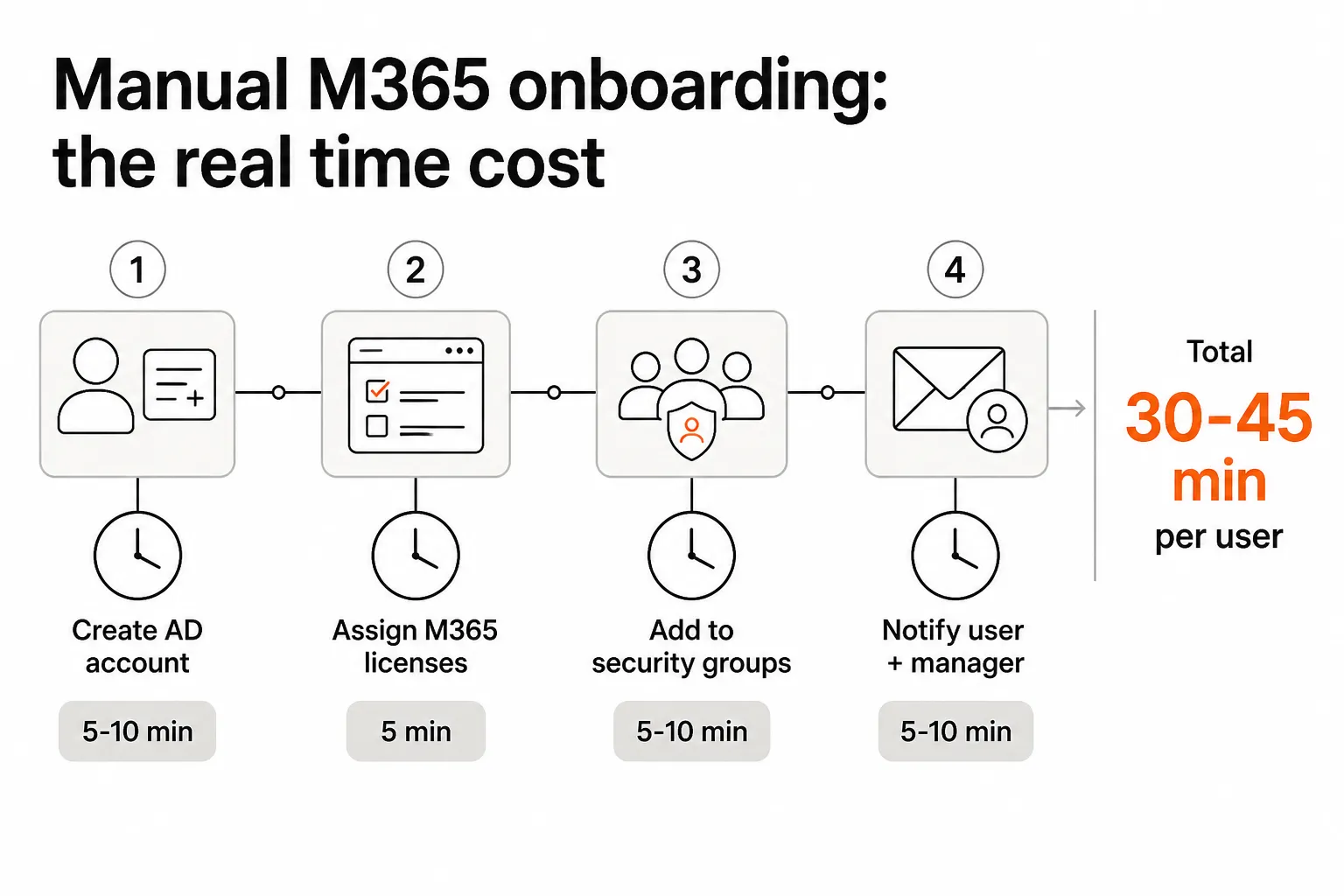
- Assign M365 licenses - E3, E5, Business Premium, or a la carte (Visio, Power BI, add-ons)
- Add to security groups - department groups, role-based groups, conditional access groups
- Grant shared mailbox access - Full Access, Send As, or Send on Behalf
- Add to distribution lists - department DLs, announcement lists, team DLs
- Configure Teams access - add to relevant Teams and channels
- Assign SharePoint permissions - site collections, document libraries
- Set up MFA - enrollment method, backup options
- Trigger device enrollment - MDM policy via Intune, RMM-based image deployment
- Notify the user and manager - welcome email, credentials, next steps
- Document in PSA and documentation tool - IT Glue, Hudu, ticket closure
That's not a 5-minute job. At 30–45 minutes per user, across a customer base with any real hiring activity, the hours pile up fast.
The real cost of doing it manually
Most MSPs think of provisioning as annoying but manageable. The math tells a different story.
Take a mid-size MSP managing 50 customers. Conservative assumptions: each customer averages 2 new hires per month. That's 100 provisioning events. At 30–45 minutes each, you're looking at 50–75 hours per month of technician time on new-hire provisioning alone - and that's before offboarding, license reviews, or permission changes.
At a loaded tech cost of $75/hour (salary, benefits, overhead), that's $3,750–$5,625 per month. For a busier MSP with 10 hires per customer per month, the number becomes $18,750–$28,125/month - a line item large enough to justify a dedicated hire.
The honest answer is that most MSPs aren't tracking this number. Provisioning work gets absorbed into the general ticket volume, attributed to "L1 overhead," and never isolated as a cost center. Which means the savings from automation never get credited either.
"Most MSPs built their provisioning workflows years ago and haven't revisited them since. The customers they're serving have changed." - LinkedIn practitioner post on M365 provisioning, 2025
The other hidden cost: license sprawl. Oversized licenses (users assigned E5 when they only need email), forgotten add-ons (Visio, Power BI assigned during onboarding and never reviewed), and inactive users still consuming licenses. Research estimates 10–20% of customer license spend is wasted due to poor lifecycle management. Across 50 customers, that's $40,000–$90,000/year in recoverable waste - value an MSP can capture by running proper offboarding and regular license audits.
Where MSPs actually lose the game: offboarding
Here's the uncomfortable truth: onboarding is the problem MSPs focus on, but offboarding is where the real damage happens.
Onboarding has a forcing function. There's a start date. The manager sends a ticket. IT has to act or someone shows up Monday with no access and a very frustrated client call follows. The process is deadline-driven.
Offboarding doesn't have the same urgency. The employee is already gone. The ticket might come in a day late, or a week late. And when it does arrive, there's no one following up to check whether everything actually got done.
The gap shows up in predictable places:
- Active licenses on departed users - the account gets disabled but the license isn't released. Microsoft keeps billing. The customer keeps paying.
- Lingering group memberships - the user is removed from their primary department group but left in 3 other groups they were added to over two years.
- Orphaned shared mailbox access - the departing employee had Full Access to the CFO's mailbox "temporarily, two years ago." Nobody noticed.
- No audit trail - when a compliance auditor asks "prove this person no longer has access," there's a spreadsheet with a checkbox and a date. That won't pass a SOC 2 review.
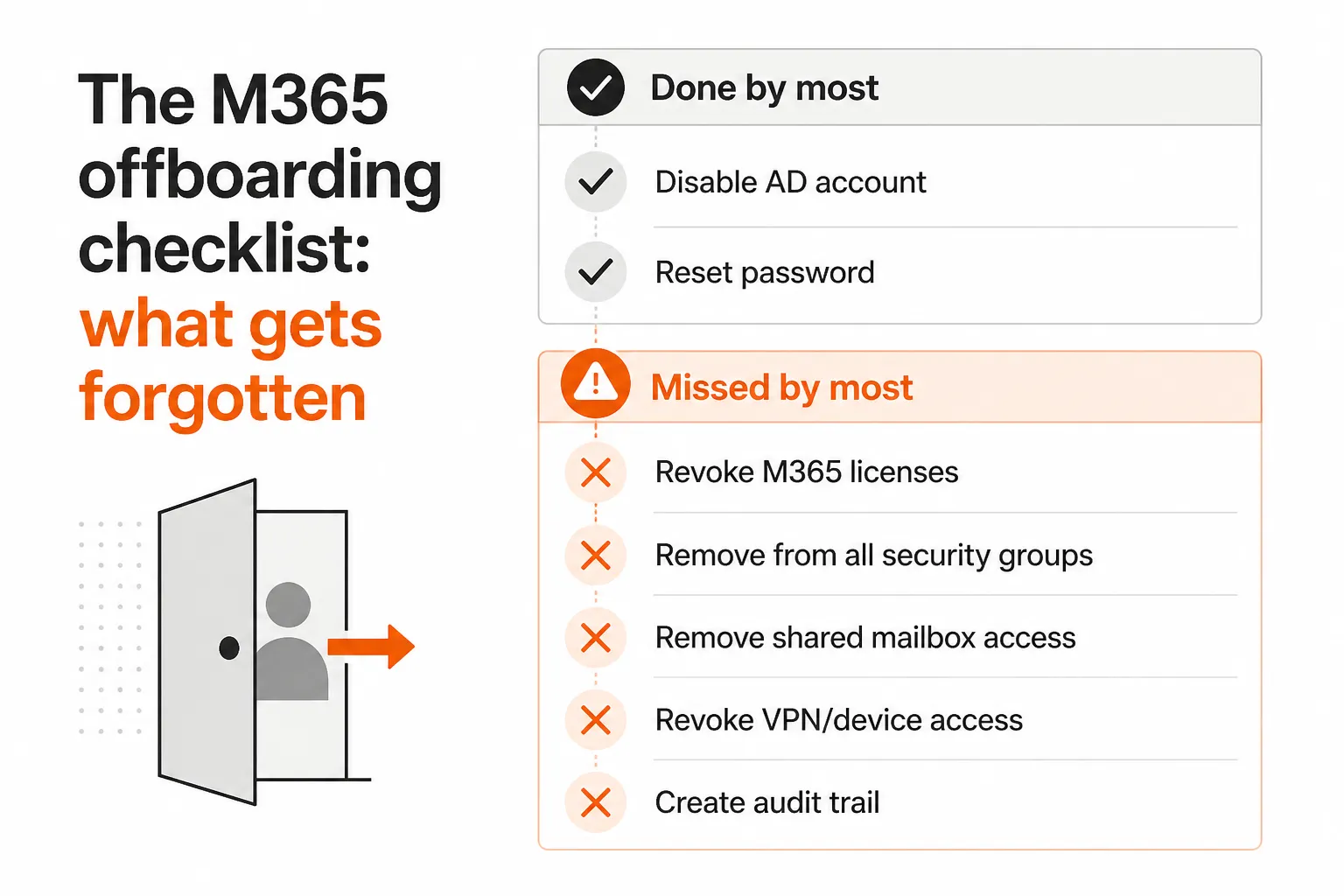
A complete offboarding workflow mirrors onboarding: reset password across all systems, disable the Entra ID account, revoke M365 licenses, remove from all security groups, disable email forwarding, reclaim shared mailbox access, revoke VPN and device access via RMM, notify the manager, and create a documented audit trail. Most teams get the first two right. The rest is inconsistent at best.
This is why offboarding is harder than onboarding - not technically, but organizationally. It requires the same rigor, on a schedule nobody manages, against a checklist nobody's auditing.
How MSPs handle provisioning today
Most MSPs run some combination of the following. None of them are particularly satisfying.
| Approach | What it does well | Where it falls short |
|---|---|---|
| PSA-native workflows (ConnectWise, HaloPSA, Autotask) | Integrated with ticket flow; no separate tool | Limited automation; basically form-filling with reminders |
| PowerShell scripts | Free; highly customizable | Breaks on Graph API updates; tribal knowledge problem; no offboarding logic |
| AdminDroid / EasyEntra | M365-specific; practical for SMBs; ~$50–100/month | Onboarding-focused; doesn't handle full lifecycle or multi-tenant at scale |
| Entra ID Governance + HR integration | Native; auditable; enterprise-grade | $10–15/user/month per governed population; 6-month implementations; needs Workday/SAP |
| Okta / JumpCloud | Full lifecycle management | Enterprise pricing; not economically viable to resell to SMB customers |
| AI technician (Tyqra) | Full lifecycle via ticket → action; multi-tenant; PSA-integrated; includes offboarding | Newest approach; requires PSA integration to be set up |
The honest pattern is this: growing MSPs start with PSA-native provisioning, hit its limits around 50 customers, write some PowerShell to fill the gaps, and then spend years maintaining those scripts as Microsoft evolves its APIs. The scripts work - until they don't, and the one tech who understood them left six months ago.
AdminDroid and EasyEntra solve the M365-specific onboarding problem well and are legitimately worth the $50–100/month for MSPs that mostly need account creation and license assignment. The gap is offboarding and multi-tenant scale: they're designed around single-tenant management, and the offboarding workflow isn't the focus.
Entra ID Governance is the "right" answer for enterprises with HR systems and IT governance budgets. For the SMB customers most MSPs serve, the per-user licensing cost and implementation timeline make it impractical.
How to automate M365 provisioning at scale
The four things an MSP automation solution actually needs to get right - and where most tools stumble on at least one:
1. Multi-tenant native, not per-customer configured. The whole point of an MSP tool is that you configure it once and it works across all customers. Solutions that require per-tenant configuration (or worse, per-customer licensing) don't scale. You want a single pane of glass where adding customer 51 is the same effort as adding customer 5.
2. No per-user licensing passed to the customer. MSPs control the tooling. Customers shouldn't have to buy seats or understand your provisioning stack. Any solution that requires the customer to pay per-user costs erodes your margin and creates friction at every renewal conversation.
3. Handles offboarding, not just onboarding. The tool that only does onboarding isn't solving the hard part. The hard part is: what happens when the employee's last day is today, the manager forgot to send a ticket until Thursday, and the user needs their access revoked from 23 groups, 4 shared mailboxes, and a VPN configuration before 5 PM? That's what automation needs to handle.
4. Integrates with the PSA so tickets trigger actions. The cleanest workflow is: HR notifies the manager, manager creates a ticket in the PSA (ConnectWise, Autotask, HaloPSA), the provisioning automation reads the ticket, executes the steps, posts an audit trail, and closes the ticket. No separate portal, no separate login, no switching context. The provisioning happens inside the workflow your techs already live in.
The math on automation is straightforward. A 50-customer MSP running 100 provisioning events per month at 30 minutes each is burning 50 hours of technician time. At $75/hour loaded cost, that's $3,750/month. Tyqra costs $3 per ticket outcome, so those 100 provisioning events come to $300 for the month. The effective ROI - provisioning alone, before you count offboarding license recovery - is over 10x in the first month.
The harder sell isn't the economics. It's the hesitation that comes from watching other AI tools promise everything and deliver configuration overhead. The MSPs we've seen adopt automation successfully tend to start with a specific, bounded use case - new hire provisioning for one customer segment - prove the workflow, then expand. That's a more defensible path than trying to automate everything at once.
Try Tyqra
Tyqra is an AI technician built specifically for MSPs. It connects to your PSA (ConnectWise, Autotask, HaloPSA, SuperOps), reads provisioning and offboarding tickets, and executes the full M365 lifecycle - account creation, license assignment, group membership, shared mailbox access, offboarding revocation, audit trail - without a human in the loop.
The key differentiator for MSPs: it operates at the MSP level, not the customer level. No per-customer configuration, no per-user licensing burden passed to your clients, and it handles the offboarding edge cases (manager leaving too, orphaned Teams, mailbox permissions) that generic scripts miss.
Pricing is $3 per ticket outcome with a $150/month minimum, and a 14-day free trial that doesn't need a credit card. Most MSPs are live in the same week they sign up, without an implementation consultant.
Frequently Asked Questions
How long does manual Microsoft 365 user provisioning take?
Manual M365 onboarding takes 30–45 minutes per user. That includes creating the Entra ID account, assigning licenses, configuring group memberships, setting up mailbox access, and notifying the user and manager. For MSPs managing 50+ customers with regular hiring, this adds up to 250+ hours per month in pure provisioning labor.
What does Microsoft 365 user provisioning include?
A complete M365 provisioning workflow includes: creating the user account in Entra ID (and syncing to on-premises AD if hybrid), assigning M365 licenses and add-ons (E3, E5, Visio, etc.), adding the user to security groups and distribution lists, granting shared mailbox permissions, enrolling the device via RMM, setting up Teams/SharePoint access, and documenting the changes in your PSA and documentation tool. Offboarding is the mirror image - revoking all of the above - and is where MSPs most often leave gaps.
What's the best tool for M365 user provisioning for MSPs?
The right tool depends on your scale and what you need to automate. PSA-native provisioning (ConnectWise, HaloPSA, Autotask) handles basic tasks but struggles with full lifecycle management. AdminDroid and EasyEntra are cost-effective for M365-specific workflows. For MSPs that want to handle provisioning as part of the helpdesk ticket flow - including offboarding - Tyqra automates the full onboarding and offboarding lifecycle by reading tickets in your PSA and executing the steps automatically, at $3 per ticket outcome, with a $150/month minimum.
Why is M365 offboarding harder than onboarding for MSPs?
Onboarding is well-defined and deadline-driven - there's a start date and a checklist. Offboarding is messier: accounts get disabled but licenses aren't revoked, users get removed from some groups but not others, shared mailbox access gets forgotten, and nobody creates an audit trail. Research estimates 10–20% of customer licenses are wasted due to incomplete offboarding. Tyqra handles scheduled offboarding with policy-based gates, reverting all permissions and documenting every step.
How much does automating M365 provisioning save an MSP?
For a typical MSP managing 50 customers, automated M365 provisioning can save 250+ hours per month - roughly $18,750–$28,125/month in labor at $75–$112/hour loaded cost. Add in the license waste recovered from proper offboarding (estimated at $40,000–$90,000/year across a 50-customer base) and the ROI on automation tools is often measured in weeks, not months.